
The final installment of this series will look at configuring detail views to listen to multiple event channels.
My first step will be to create a new Master View analysis. I am going to create a simple tabular view as my second master view including the Qtr column I have used previously for my data event driver. I have set the Channel name to MDS3 in the same way I configure my first master view.
I have saved that analysis and now want to edit 1 of my detail views to listen on this channel as well as the MDS2 channel it is currently listening on.
Just a side note: If you have been following this series, you will notice the view names have changed as well as the view layout on the dashboard page from my previous posts. I have renamed my views and reorganized them on the dashboard to make things a little clearer. Other than the changes I have outlined here, the other views remain unchanged.
So, the detail view I decided to modify is the second one I created which has the pie chart. Opening the pie chart view in the editor window and opening the properties for it, I have added my new channel to the event channel. Notice the channels are separated by a comma. With that change made, I then save this analysis.
Adding the new Master view to my dashboard page, I am ready to test this new functionality.
Clicking on the 2008 Q2 cell from my first master view, both detail views respond with the Qtr column slider moving appropriately.
I now click on the 2008 Q3 cell on my second master view, on the detail pie chart view does respond as expected with the Qtr slider moving to the appropriate value while the other detail view remains unchanged.
Thus we can see that a detail view can listen to multiple events from different master views.
There is actually more to learn and do with Master-Detail links but that is a different discussion as it involves extending OBI with some custom code. I will leave that for a later time.
Monday, February 7, 2011
Working with the Master-Detail Report Feature of OBI 11g (pt 3)
Monday, January 31, 2011
Working with the Master-Detail Report Feature of OBI 11g (pt 2)
In previous part of this series, I stepped through how to configure a Master-Detail report link when using the same analysis criteria to create the master and detail views. However, what if we want to create a totally independent detail view based on different criteria. Can we link the Master view from 1 analysis to the Detail view of another analysis?
Let’s see.
We will the Master view we created previously; so, we need to first create a new, independent Detail view and set our Event channel, the Event channel we used previously was MDS2.
Our event channel on our master view is driven by the “Per Name Qtr” so we need this column on our new detail view so that it can accept and act on the value being passed.
We will use a pie chart view for our detail view. With the view created, we can now set the Event channel through the view’s property window. We are using the slider again for the Quarter to make it easy to see the change.
With our new detail view created and configured to listen on the same channel as our master view we will add the view to our dashboard and check out if it works as we hope.
So, we have now shown that the detail view of a Master-Detail link does not need to come from the same report criteria as the master view.
I did come across an issue when using Master-Detail links and setting up a detail view to listen on the event channel, but configuring the layout of the detail view to not allow it to respond correctly. For example, I added a tabular view to my Master-Detail dashboard but placed the Qtr column in the “section” area of the layout. The report displayed all 4 quarters when I issued the event and my other detail views responded as expected. However when I tried issuing a subsequent event, none of the detail reports would respond. For the tabular view to respond correctly to an event, the column accepting the event must be placed in the “page” area of the view layout.
Here is a table containing specifics about views being used as detail views.
Answers Dashboard Reports: Directory Structure Best Practices
When developing reports and organizing them on dashboards, it is important to keep the reports named and grouped in a way that is consistent and intuitive, making life easier for yourself and others who may work with them in the future.
1. Use a Consistent Naming Convention
Use names that are descriptive but concise
Include a theme, dashboard topic or subject area in report names, such as AR, Bonus Goals, or Executive Summary to communicate the general content
- Using a theme, dashboard topic or subject area consistently at the beginning of report names can make it easier to organize reports, since those with similar names will be listed together within the directory and will appear in alphabetical order
- Include a general description of what is in the report, such as Accounts Past Due or Commissions by Region, to make it clear what is contained in the report
- Full report names may look something like this: "AR Accounts Past Due" or "Sales Commissions by Region"
- Additional detail may be added to the title if there are different variations, such as "AR Accounts Past Due (Top Ten)" or "Sales Commissions by Region Year to Date"
- Use abbreviations for generally accepted business terms or terms used within your organization, such as "AR" for "Accounts Receivable" or "YTD" for "Year to Date"

2. Create folders for each dashboard page and/or tab to make the reports easier to find for updating and editing
- If using identical reports on more than one dashboard, both can refer to the same report, or a duplicate can be created
- If the report will be customized or changed for use on another dashboard, make another copy so the original version does not get changed inadvertently. If there is more than one version, especially in the same directory, make the names descriptive so it is easy to tell which version is which, e.g. "Accounts Past Due by Month" or "Accounts Past Due YTD"

3. Housekeeping
- Keep only the most current version and delete previous copies that are no longer used. This makes organization easier, makes it easier to find what is needed, and helps prevent the inadvertent use of an incorrect or outdated version of a report
Thursday, January 27, 2011
Working with the Master-Detail Report Feature of OBI 11g (pt. 1)
One of the new features included in OBI 11g is the Master-Detail linking feature. The Master-Detail linking allows you to establish a relationship between 2 or more views; one view is called the Master and will drive changes in 1 or more views called detail views.
You can think of a Master-Detail relationship in a similar manner that you would when navigating from 1 report to another works, but you do not lose sight of the master view.
So, how do we implement a Master-Detail link?
We start out by defining an analysis that will be used to create the master view. Here we have created a simple analysis and filtered for Year = 2008.
Now we want to configure this analysis so that we can create our master view. We will select the “Per Name Qtr” column as the data driver; so, we open the Column Properties window of this column and move to the Interaction tab.
Here we select the “Send Master-Detail Events” under the Value Primary Interaction. Once you select this option a secondary edit box labeled “Specify channel” will be made available. You can enter any unique identifier in this box. For our example, we have entered “MDS2”.
Unlike some interaction options like Action Links” which is available on both Column Heading and Value, the Master-Detail option is only available on the Value. This has to do with how a Master-Detail link functions. The value of the cell you click on is passed to the detail view(s); thus, a column heading cannot be used.
We now navigate to Results and create the view we want as our Master view. Here we are using a simple tabular view. Notice that our “Per Name Qtr” values do not show the typical hyperlink that you would expect from the time dimension column.

Now we need to create a detailed view that will listen to events from our master view. To do this, we will add an additional graphical view from the same analysis. Our graphical view will look at Revenue by Brand with our Quarter values placed into a view slider.
With our graphical view in edit mode, we need to open the properties window.
One of the properties available to us is the “Listen to Master-Detail Events” checkbox. By checking this box, we can define this view to be a detailed view for the event channel we want. In our case, we will enter the value “MDS2” as our event channel which is the same value we defined on the “Per Name Qtr” column properties which is our data driver on the master view.
We want to validate our Master-Detail report is working as expected. We will do this by placing the compound layout on to a dashboard page. I have edited the compound layout so that my views, master and detail, are side-by-side. When you click on a cell under the “Per Name Qtr”; such as, “2008 Q2” on the tabular master view, the secondary detail view (graph) accepts the Qtr value and the slider automatically moves to the selected value.
We will continue to explore the Master-Detail link by looking at more advanced features of this link in my next entry.
Monday, December 27, 2010
Three dashboard ideas for finance executives, a good read for those thinking of their organization’s strategy for the coming year…
On this holiday week I decided to dedicate this post to giving some thought to the challenges leaders of finance organizations face and to looking at them in terms of coming up with a short list of indicators that can be leveraged as they reflect on the ways to shape their team’s strategy in a way that maximizes their contribution and impact on the company this soon to come new year.
To keep things simple and avoid taking too much of your holiday time this post focuses on three dashboard ideas that align values and traits of high performance teams and that are built in response to governance and strategic challenges common to many financial organizations.
These dashboards can be easily implemented with Oracle Business Intelligence or other similar reporting tool. My recommendation is to have the first iteration of your dashboard be as simple and concise as possible and build upon it as your needs and processes evolve.
Discipline (IRR)
One of the organizational values that are hardest to measure is the discipline that your overall organization exhibits when making strategic decisions. Measuring the return on capital allocations is a process common in large conglomerates that isn’t always transparent or free of political maneuvering.
Deploying a simple dashboard that tracks the progress of large strategic projects in terms of both schedule and actual versus budgeted costs allows the office of the CFO to educate executives and managers in other areas on financial methodologies such as calculating the Internal Rate of Return (IRR) of a project or estimating the Total Cost of Ownership of a piece of equipment.
Having a dashboard with Key Performance Indicators that measure the rate of return, and actual versus projected performance in terms of cost and schedule will help your organization bring more transparency to the process of deciding which projects will be funded and will help your counterparts in other areas of the business in improving their financial decision making skills.
Efficiency (Time To Close)
One other function that usually resides with the finance organization is the process of closing the books and preparing financial and management reports. This process which is, for the most part, simple and repetitive is implemented and managed very differently from company to company. These differences are often a result of industry specific accounting and differences in management style.
The best way to save your staff late nights and weekends while delivering analysis and reports to your management faster might be as unorthodox and simple as breaking your closing process in the different tasks that compose it and tracking the time each of them takes to complete each month. You can start simply by writing the list on a white board and later on make the transition to a dashboard page that can be shared with all of your team.
By understanding which components of your closing process take the most effort from your team you gain great visibility and thinker with the processes to shorten your cycle time. There have been corporations that implement daily reconciliation of their accounts therefore gaining the ability to detect unusual account activity much faster than if they had to wait for the bank statements to arrive in the mail.
You can use the data in your closing cycle dashboard as a development opportunity for your staff by encouraging them to detect processes that exhibit a lot of variance from month to month and coming up with ways to proactively eliminate the causes of this variance.
Value Creation
With the economy signaling it is finally turning around towards recovery and finance and accounting staff job satisfaction at the lowest level in years it is time to identify top performers and give them opportunities to feel challenged and excel.
It is in the best interest of finance leaders to create opportunities for their staff to get out of the routine of their day to day work and go work in teams within other functional areas of the organization by providing them with internal consulting on financial management and compliance best practices. This aligns very closely with the first dashboard idea, your staff can provide training and consulting to teams working on strategic projects being tracked on the IRR/Projects dashboard.
The value created by these select members of your team can be tracked by the number of projects they are consulting for and the number of training and consulting hours they provide to other areas of your organization. This in turn can be used as a tool in the justification of any proactive compensation activity you might decide to undertake as you try to retain high performing employees in your team.
Conclusion
When planning your finance organization’s strategy for the year that is about to begin you can use the dashboard ideas in this article as tools that will allow you to communicate to your staff and to other functional areas and fellow executives what improvement is being made in the internal processes of your area and; most important, how is it that your team can be engaged as a partner in value creation.
Please send your feedback and comments to Ignacio.delaTorre@biconsultinggroup.com, I’ll be very interested to hear your opinion and any additional ideas that might be useful to others reading this article.
Tuesday, December 7, 2010
Integrating Relational Databases with Essbase Studio
Integrating Relational Databases with Essbase Studio
Because relational databases can store several terabytes of data, they offer nearly unlimited scalability. Multidimensional databases, generally smaller than relational databases, offer sophisticated analytic capabilities. By integrating a relational database with an Essbase database, you leverage the scalability of the relational database with the conceptual power of the multidimensional database.
By default, when Essbase Studio creates an Essbase outline, it loads all member levels specified in the metaoutline into a multidimensional database. You can, however, set Essbase Studio to build to a specified member level (Hybrid Analysis) or build only to the dimension level (Advanced Relational Access). Building down to a specified level produces a smaller multidimensional database and a smaller Essbase outline.
A source relational database can be integrated with an Essbase database by using XOLAP (extended online analytic processing). This is a variation on the role of OLAP in business intelligence. Specifically, XOLAP is an Essbase multidimensional database that stores only the outline metadata and retrieves data from a relational database at query time. XOLAP thus integrates with an Essbase database, leveraging the scalability of the relational database with the more sophisticated analytic capabilities of a multidimensional database.
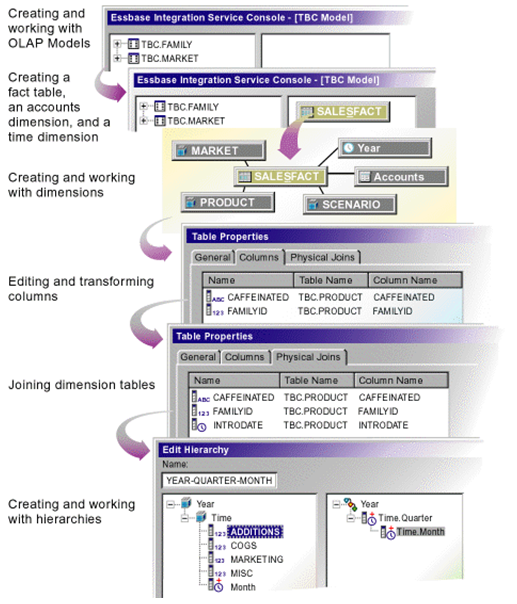
Essbase Studio - Model Development Workflow
Some XOLAP Specifics
- XOLAP (extended online analytic processing) is a variation on the role of OLAP in business intelligence. Specifically, XOLAP is an Essbase multidimensional database that stores only the outline metadata and retrieves data from a relational database at query time. XOLAP thus integrates a source relational database with an Essbase database, leveraging the scalability of the relational database with the more sophisticated analytic capabilities of a multidimensional database.
- OLAP and XOLAP store the metadata outline and the underlying data in different locations:
- In OLAP, the metadata is located in the Essbase database, and the underlying data is also located in the Essbase database.
- In XOLAP, the metadata is located in the Essbase database while the underlying data remains in your source relational database.
- The differences in the locations of the metadata and data are key to understanding how XOLAP can be of benefit because these differences affect the functionality of OLAP and XOLAP.
- OLAP lends itself to traditional relational data storage and data analysis. XOLAP lends itself to operations supported in mixed or "hybrid" environments such as Hybrid Analysis and Advanced Relational Access (familiar to users of Essbase and Essbase Studio). Many of the basic concepts of Hybrid Analysis and Advanced Relational Access have been folded into the functionality of XOLAP cubes in Oracle Essbase Studio.
XOLAP Workflow
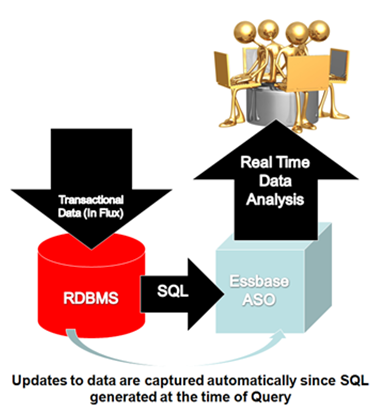
The workflow of data retrieval in an XOLAP environment is much like that of a non-XOLAP environment:
- The model is designated as XOLAP-enabled in Essbase Studio.
- The cube is deployed in Essbase Studio; however, no data is loaded at that time.
- The Essbase database is queried, using Smart View, Oracle Essbase Visual Explorer, or another reporting tool which can access an Essbase database.
- Essbase dynamically generates the required SQL to retrieve the data from the source relational database.
Integrating XOLAP with Traditional OLAP Sources

XOLAP has the following restrictions:
- No editing of an XOLAP cube is allowed. If you wish to modify an outline, you must, instead, create a new outline in Oracle Essbase Studio. XOLAP operations will not automatically incorporate any changes in the structures and the contents of the dimension tables after an outline is created.
- When derived text measures are used in cube schemas to build an Essbase model, XOLAP is not available for the model.
- XOLAP can be used only with Aggregate Storage. The database is automatically duplicate-member enabled.
- XOLAP supports dimensions that do not have a corresponding schema-mapping in the catalog; however, in such dimensions, only one member can be a stored member.
Usages Not Supported in XOLAP
XOLAP does not support use of the following:
- Flat files
- Ragged hierarchies
- Alternate hierarchies
- Recursive hierarchies
- Calendar hierarchies
- Filters
- Typed measures
- User defined members at the leaf level
- Multiple relational data sources
Hybrid Analysis
Hybrid Analysis eliminates the need to load and store lower-level members and their data within the Essbase database. This feature gives Essbase the ability to operate with almost no practical limitation on outline size and provides for rapid transfer of data between Essbase databases and relational databases.
Hybrid Analysis integrates a relational database with an Essbase multidimensional database so that applications and reporting tools can retrieve data directly from both databases.
Data Flow for Hybrid Analysis
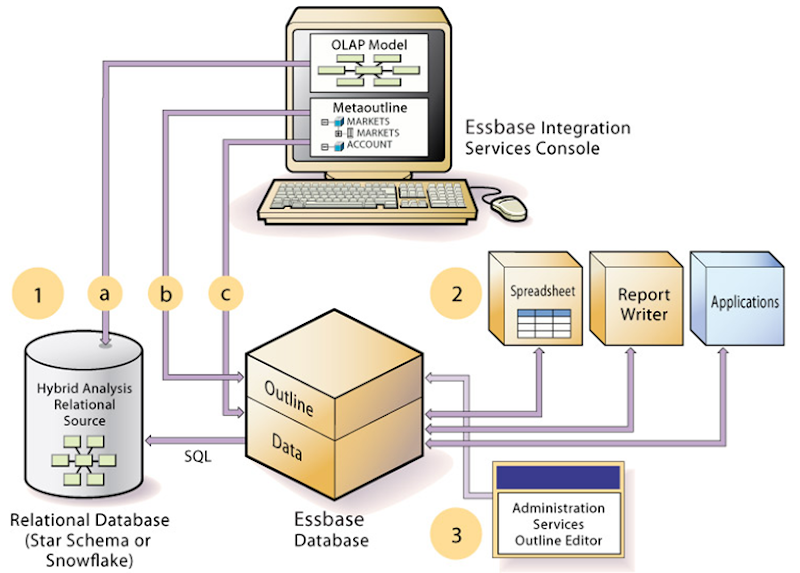
- The initial step in setting up XOLAP or Hybrid Analysis is to define the relational database as a XOLAP or Hybrid Analysis relational source.
- You define the XOLAP or Hybrid Analysis relational source in Essbase Studio. Through Essbase Studio, you first specify the relational data source for the OLAP model. The OLAP model is a schema that you create from tables and columns in the relational database. To build the model, Essbase Studio accesses the star schema of the relational database. Using the model, you define hierarchies and tag levels whose members are to be enabled for Hybrid Analysis. You then build the metaoutline, a template containing the structure and rules for creating the Essbase outline, down to the desired Hybrid Analysis level. The information enabling Hybrid Analysis is stored in the OLAP Metadata Catalog, which describes the nature, source, location, and type of data in the Hybrid Analysis relational source.
- Next, you perform a member load, which adds dimensions and members to the Essbase outline. At this point XOLAP databases are complete and can queried by a multitude of reporting tolls.
- For Hybrid Analysis databases, when the member load is complete, you must run a data load to populate the Essbase database with data.
- Applications and reporting tools, such as spreadsheets and Report Writer interfaces, can retrieve data directly from both databases using the dimension and member structure defined in the outline, Essbase determines the location of a member and then retrieves data from either the Essbase database or the Hybrid Analysis relational source if a Hybrid Analysis database and from the relational data source when a XOLAP model is specified.
- If the data resides in the Hybrid Analysis relational source, Essbase retrieves it through SQL commands.
- XOLAP also leverages transactional SQL to access data from the fact table at the time the query is initiated by the end user.
- To modify the outline in Hybrid Analysis, you can use Outline Editor in Administration Services to enable or disable dimensions for Hybrid Analysis on an as-needed basis. Changes to metadata in XOLAP require a complete drop and rebuild of the Application and database through Essbase Studio
Comparison of Aggregate and Block Storage
Since XOLAP only supports the Aggregate Storage Kernel, it is pertinent to highlight the differences in ASO and BSO.
Essbase provides an aggregate storage kernel as a persistence mechanism for multidimensional databases. Aggregate storage databases enable dramatic improvements in both database aggregation time and dimensional scalability. The aggregate storage (ASO) kernel is an alternative to the block storage (BSO) kernel. Aggregate storage databases typically address read-only, "rack and stack" applications that have large dimensionality, such as the following applications:
- Customer analysis. Data is analyzed from any dimension, and there are potentially millions of customers.
- Procurement analysis. Many products are tracked across many vendors.
- Logistics analysis. Near real-time updates of product shipments are provided.
Aggregate storage applications, which differ from block storage applications in concept and design, have limitations that do not apply to block storage applications.
Inherent Differences between ASO and BSO
| Inherent Differences | Aggregate Storage | Block Storage |
|---|---|---|
| Storage Kernel | Architecture that supports rapid aggregation, optimized to support high dimensionality and sparse data | Multiple blocks defined by dense and sparse dimensions and their members, optimized for financial applications |
| Physical Data Storage | Through the Application Properties window, Tablespaces tab in Administration Services | Through the Database Properties window, Storage tab in Administration Services |
| Databases supported per application | One | Several (one recommended) |
Outline Differences with ASO and BSO
| Outline Functionality | Aggregate Storage | Block Storage |
|---|---|---|
| Multiple hierarchies enabled, dynamic hierarchy, or stored hierarchy designation | Relevant | Irrelevant |
| Accounts dimensions and members on dynamic hierarchies | Support with the following exceptions: • No association of attribute dimensions with the dimension tagged Accounts • Additional restrictions for shared members. | Full support |
| Members on stored hierarchies | Support with the following exceptions: • Support for the ~ (no consolidation) operator (underneath label-only members only) and the + (addition) operator • Cannot have formulas • Restrictions on label only members • No Dynamic Time Series members • Stored hierarchy dimensions cannot have shared members. Stored hierarchies within a multiple hierarchies dimension can have shared members. | Full support |
| Member storage types | Support with the following exceptions: • Dynamic Calc and Store not relevant • On stored hierarchies, two limitations if a member is label only: o All dimension members at the same level as the member must be label only o The parents of the member must be label only. | Support for all member storage types in all types of dimensions except attribute dimensions |
Calculation Differences between ASO and BSO
Calculation Functionality | Aggregate Storage | Block Storage |
|---|---|---|
| Database calculation | Aggregation of the database, which can be predefined by defining aggregate views | Calculation script or outline consolidation |
| Formulas | Allowed with the following restrictions: Must be valid numeric value expressions written in MDX No support for Essbase calculation functions On dynamic hierarchy members, formulas are allowed without further restrictions | Support for Essbase calculation functions |
| Calculation scripts | Not supported | Supported |
| Attribute calculations dimension | Support for Sum | Support for Sum, Count, Min, Max, and Average |
| Calculation order | Member formula calculation order can be defined by the user using the solve order member property | Defined by the user in the outline consolidation order or in a calculation script |
Partitioning Differences between ASO and BSO
Partitioning Functionality | Aggregate Storage | Block Storage |
|---|---|---|
Partitioning | Supported with the following restrictions: No Outline Synchronization | Fully supported |
Data Load Differences between ASO and BSO
| Data Load Functionality | Aggregate Storage | Block Storage |
|---|---|---|
| Cells loaded through data loads | Only level 0 cells whose values do not depend on formulas in the outline are loaded | Cells at all levels can be loaded (except Dynamic Calc members) |
| Update of database values | At the end of a data load, if an aggregation exists, the values in the aggregation are recalculated | No automatic update of values. To update data values, you must execute all necessary calculation scripts. |
| Data load buffers | The loading of multiple data sources into aggregate storage databases is managed through temporary data load buffers. | Not supported |
| Atomic replacement of the contents of a database | When loading data into an aggregate storage database, you can replace the contents of the database or the contents of all incremental data slices in the database. | Not supported |
| Data slices | Aggregate storage databases can contain multiple slices of data. Data slices can be merged. | Not supported |
| Dimension build for shared members | Full support for parent-child build method. Duplicate generation (DUPGEN) build method limited to building alternate hierarchies up to generation 2 (DUPGEN2). | Support for all build methods |
| Loading data mapped to dates | In a date-time dimension, you can load data into level-0 members using supported date-format strings instead of member names. | Date-time dimension type is not supported. |
Query Differences between ASO and BSO
| Query Functionality | Aggregate Storage | Block Storage |
|---|---|---|
| Report Writer | Supported, except for commands related to sparsity and density of data | Fully supported |
| Spreadsheet Add-in | Supported, with limited ability to change data (write-back) | Fully supported |
| API | Supported | Supported |
| Export | Support with the following restrictions: • Export of level 0 data only (no upper-level export) • No columnar export | Supported |
| MDX queries | Supported | Supported |
| Queries on attribute members that are associated with non-level 0 members | Returns values for descendants of the non-level 0 member. | Returns missing for descendants of the non-level 0 member |
| Queries on attribute members and shared members | A shared member automatically shares the attribute associations of its nonshared member | A shared member does not share the attribute associations of its nonshared member |
| Query logging | Not Supported | Supported |
| Query performance | Considerations when querying data from a dimension that has multiple hierarchies. | Hierarchies not relevant |
Feature Differences between ASO and BSO
| Featues | Aggregate Storage | Block Storage |
|---|---|---|
| Aliases | Supported | Supported |
| Currency Conversion | Not Supported | Supported |
| Data Mining | Not Supported | Supported |
| Hybrid Analysis | Support with the following restriction: queries that contain a relational member and an Essbase member with a formula in the same query are not supported. | Supported |
| Incremental Data Load | Supported | Supported |
| LROs | Not Supported | Supported |
| Time Balance Reporting | Support with the following restrictions: • Skip Zeros is not supported • Time dimension must contain at least one stored hierarchy • Shared members must be at level zero | Supported |
| Triggers | After-update triggers supported | On-update triggers and after-update triggers supported |
| Unicode | Supported | Supported |
| Variance Reporting | Not Supported | Supported |
| Date-time dimension type and linked attribute dimensions | Supported | Not Supported |
| User ability to change data (write-back) | Transparent partition technique used to enable limited write-back | Fully Supported |
Links to Blogs written by BICG on XOLAP
Part 1 of the XOLAP blog
http://oraclebiblog.blogspot.com/2010/02/xolap-virtual-cubes-against-data.html
Part 2 of the XOLAP blog
http://oraclebiblog.blogspot.com/2010/02/xolap-virtual-cubes-against-data_15.html
Friday, December 3, 2010
OBI 11G Fusion Middleware Control (EM)
Fusion Middleware Control:
The Fusion Middleware Control console is used to monitor and start/stop various OBI components. It is located on the application server at http://localhost:7001/em. Much of the configuration of OBI that used to be done in the NQSConfig.ini files can now be done using this front end console, which in turns updates the NQSConfig.ini file. Things in the NQSConfig.ini file that are set by EM are noted in the file with '# This Configuration setting is managed by Oracle Business Intelligence Enterprise Manager'. The only thing I noticed that needs to be setup manually in the NQSConfig.ini file are:
1. Usage Tracking
2. Dynamic Libraries
3. Query Optimization Flags
4. MDX Member Name Cache Section (SAP BW)
5. More specific General Settings where EM doesn't contain the level of detail required
The Fusion Middleware Control EM console has five tabs to manage the application. From the domain tree, expand Business Intelligence and click coreapplication as shown below.

Overview:
This view shows system status, and allows you to start/stop the system. The other tabs allow you to further configure the application.
Capacity Management:
This view has four tabs:
-Metrics: This gives metrics on request response time, load and query errors. You once might have looked at Usage Tracking for this information.
-Availability: Shows current availability of all components, allowing you to start/stop them. Also includes 'Point of Failure' analysis which shows areas in the infrastructure likely to fail when a hardware/software failure occurs.
-Scalability: This tab lets you enable Verticle Clustering, increasing the amount of instances of OBI on a server.
-Performance: Used for cache management, including settings that would have been set in NQSConfig.ini in 10g. It manages user query response time and max rows returned, settings that were set in InstanceConfig.xml.
Diagnostics:
This view has 2 tabs. One for server log messages, and the other for log file settings. These used to be kept in the RPD and the NQSServer.log.
Security:
This view allows you to enable SSO. Also links to Weblogic Admin Console Security realm to manage Weblogic security.
Deployment:
This section is for managing the deployment of various aspects of OBI 11G.
-Presentation: Contains a few settings for Dashboard and Analysis defaults. These used to be managed on a less global scale through Manage Privileges.
-Repository: This is where the RPD and Presentation Services are managed, and shared between servers for horizontal clustering.
-Scheduler: Schema connection information for the scheduler tables
-Marketing: For Siebel Marketing connection
-Mail: Scheduler mail server connection information


 Posts
Posts


